
SuCo Hub
Advertiser Platform
SuCo Hub is a tool used by account managers and advertising partners to manage and track data.

Overview
The Problem
Advertisers using the new Ad Delivery System need a way to track their data and KPIs in a fast and intuitive way.
The Solution
SuCo Hub is a web application that allows users to track performance of ads at a glance as well as take a deeper dive into KPIs for various data sets.
Skills
Tools
Product Overview
The two main users for this platform are advertisers (external) and Account Managers (internal). Account Managers have access to all screens used by advertisers along with some additional screens to help manage users.

Advertiser Dashboard
-
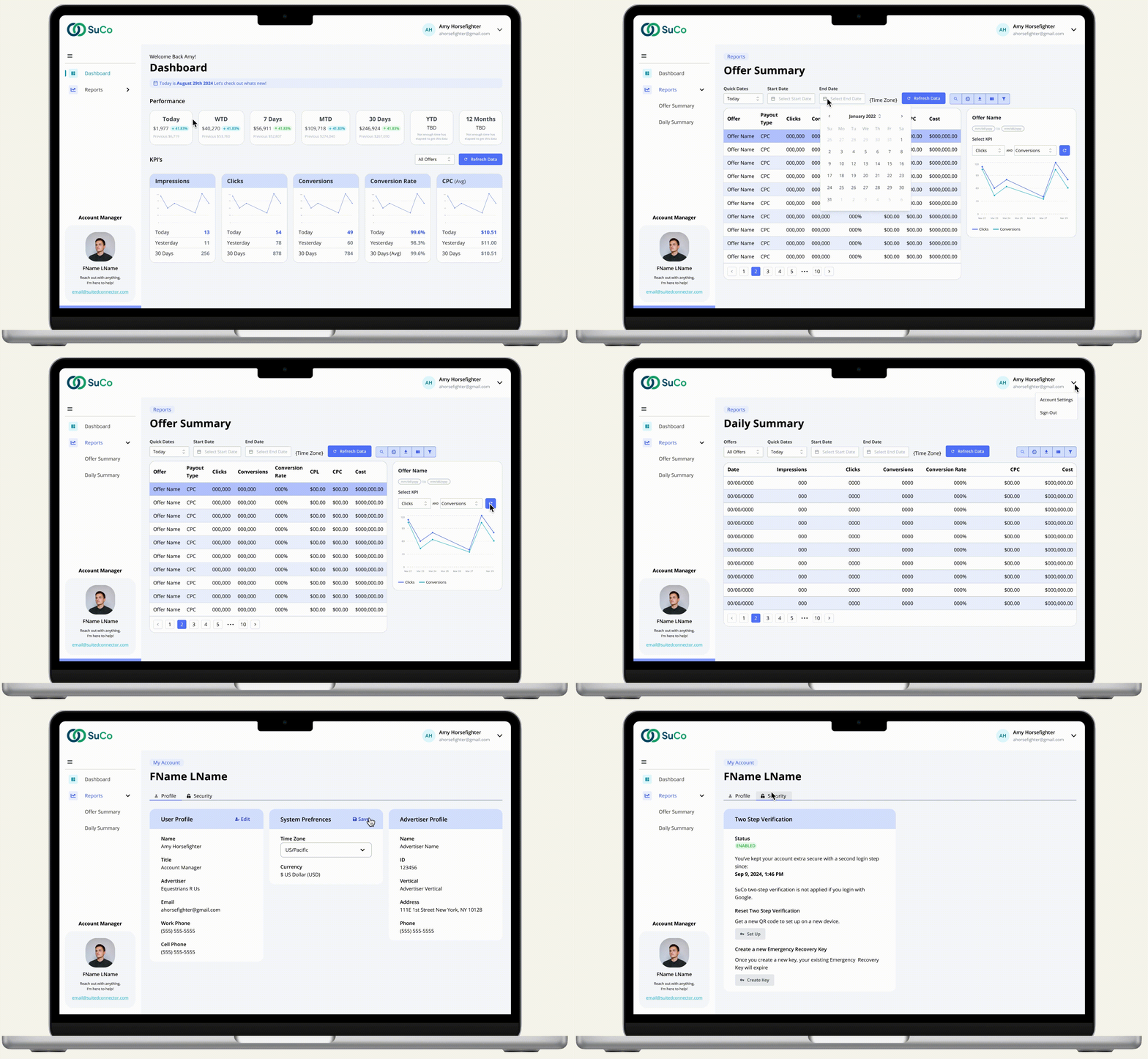
Track performance and KPIs at a glance for all running offers
-
View performance/revenue at given time frames and compare to previousstats
-
View KPIs at a glance or click to open a bigger graph with 30 days of data
-
Filter KPIs down by offer
-
View account manager information and easily contact them for help if needed

Offer Summary Report
-
View KPIs by offer
-
Click on a row for a visual comparison between two KPIs
-
Use quick keys to select a day or select a date range to filter data by
-
Export table to easily share with partners
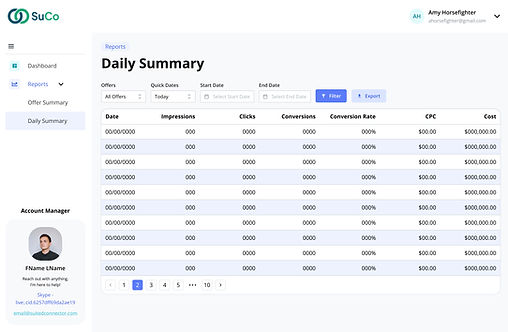
Daily Summary Report
-
View KPIs per day
-
Summarize data for all offers or filter by a single offer
-
Use quick keys to select a day or select a date range to filter data by
-
Export table to easily share with partners

Account Manager Dashboard
-
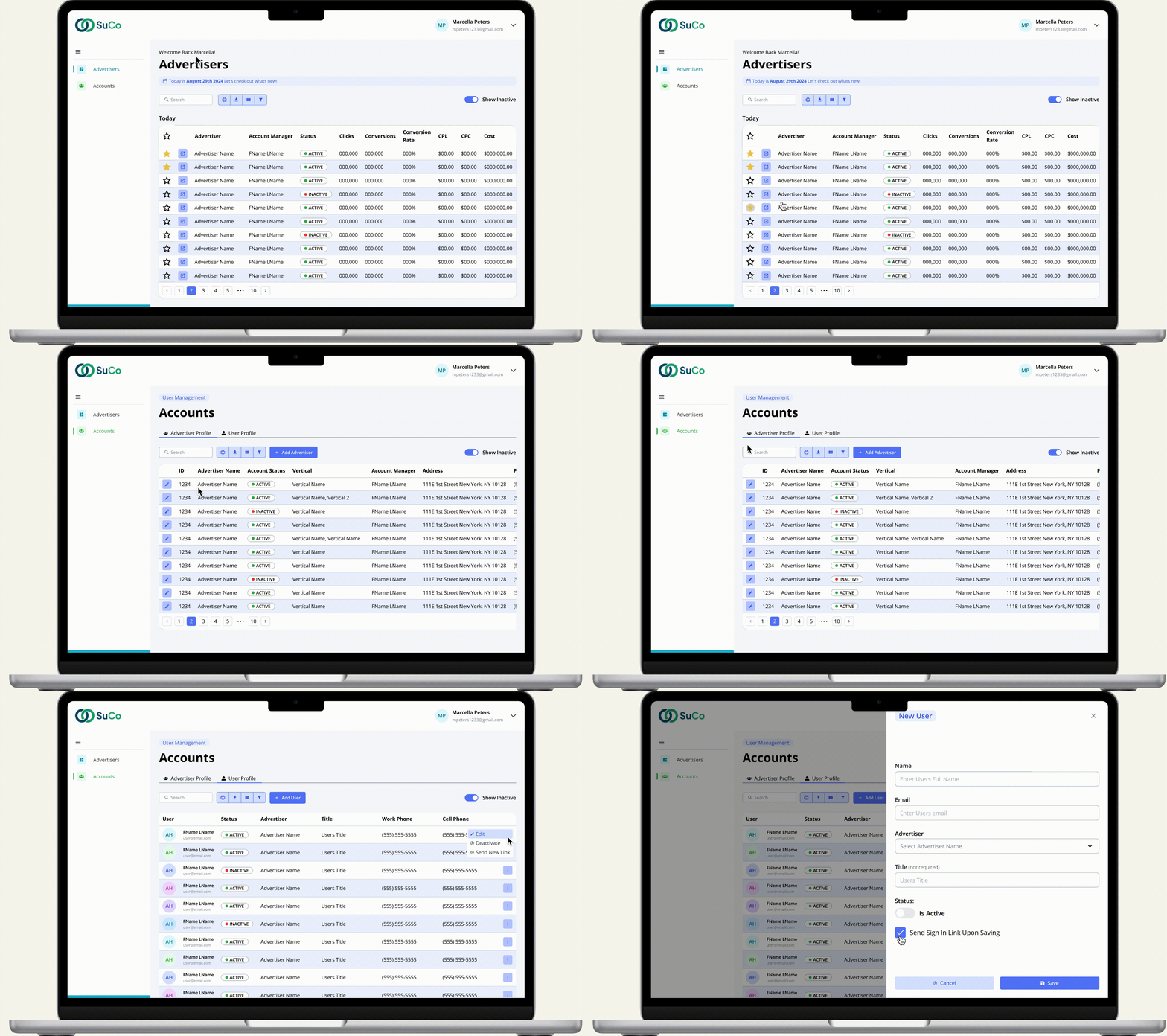
View summary of todays KPIs per advertiser
-
Favorite your accounts to easily view at the top of your table
-
Open an advertiser in a new browser tab to easily toggle between multiple accounts
-
Track advertiser status
-
Search, print, download and sort table data
Research
Throughout the research phase of this project, I aimed to strike a balance between stakeholder priorities and user needs. To achieve this, I collaborated closely with stakeholders to align with broader company objectives and worked with account managers who had deep insights into client needss. While I faced the challenge of not being able to interact with users directly, I addressed this by formulating targeted questions for account managers to pose to their clients.
In addition to this indirect user research, I conducted competitive analysis to evaluate existing products in the market, ensuring my designs were both intuitive and aligned with user expectations from similar platforms. I also explored best practices for specific UI components, such as tables and dashboards, with a strong focus on accessibility and usability.
Research Plan
To structure my research effectively, I categorized my questions based on the different user groups, tailoring them to address the unique needs of each audience. I ensured the questions were open-ended to encourage detailed insights and reduce the risk of bias.
In addition, I thought of logistical questions for the tech team to evaluate for the practicality and maintenance of the app. To gain a comprehensive understanding, I also analyzed the current site users rely on, identifying its strengths and weaknesses as a foundation for improvement.

Site Map & User Flows
Site Map
Given the complexity of the site, which includes three distinct user roles (internal, external, and account manager), creating a clear site map was crucial. This not only helped streamline the design process but also provided our development team with a clear reference for assigning user roles and determining which screens should be displayed for each.
As the site continues to grow in future stages I will continue to update the sitemap accordingly.

User Flow
One of the key technical challenges was designing the user flow for the sign-in and sign-up processes. Since this was the company's first external platform, they were still navigating the technical aspects while I was creating my designs. This required me to remain flexible and adapt as the team gained a better understanding of the software's capabilities and limitations. For example, the team initially planned to require passwords, but later discovered this wasn’t necessary, prompting us to adjust the user flow accordingly.
Additionally, there was significant debate over who would be responsible for signing up new users—the users themselves or account managers. Initially, I envisioned a traditional sign-up process where users would fill out a form and receive their login information via email. However, due to security and technical constraints, it was ultimately decided that account managers would handle this process
Sign In Process

Sign Up Process

Prototypes
Internal users have all the same access that external users do along with additional screens to help add and manage users. Additionally they have a dashboard with the a daily overview of all advertiser's KPI's. External users can only see their personal data. To hone in on a particular advertisers data external users can click on the open button on the advertiser table and a new tab will open to that advertisers dashboard and reports pages. This way account managers can open as many advertisers as they want, while still having visibility to manage accounts.
Internal Users
External Users
Implementation & QA
I collaborate with my team to manage the implementation process using Jira tickets. I create initial tickets for each section of my design, providing detailed step-by-step instructions along with mockups and prototypes to illustrate the intended outcome. These tickets are then reviewed by my project manager, who adds any additional technical insights from the team. After a team-wide review, the tickets are assigned to developers. During development, I remain available to answer any questions or provide clarifications.
Once development is complete, each ticket undergoes a peer review followed by a QA review. During QA, my team and I evaluate the tickets to ensure alignment with the approved mockups and verify functionality. Most tickets go through multiple rounds of QA before final approval. I’ve found that providing clear visuals and concise notes during QA is essential for ensuring feedback is accurately understood and addressed.